
Github Profile Trophy
🏆 Add dynamically generated GitHub Trophy on your readme


# Quick Start
Add following code to your readme.
Change the `?username=` value to your GitHub's username.
```
[](https://github.com/ryo-ma/github-profile-trophy)
```

## Use theme
Add optional parameter of theme.
```
[](https://github.com/ryo-ma/github-profile-trophy)
```

**[More detail](#apply-theme)**
# About Rank
Ranks are `SSS` `SS` `S` `AAA` `AA` `A` `B` `C` `UNKNOWN` `SECRET`.
| Rank | Description |
| ---- | ---- |
| SSS, SS, S | You are at a hard to reach rank. You can brag. |
| AAA, AA, A | You can reach the rank if you do your best. Let's aim here first. |
| B, C | You are in a growing process. |
| UNKOWN | You have not yet taken action. Let's act first. |
| SECRET | The rank is very rare. The trophy will not be displayed until the conditions are met. |
## Secret Rank
The acquisition condition is secret, but you can know the condition by reading this code.

There are still few secret trophies.
Therefore, if you come up with interesting conditions, I am waiting for contributions.
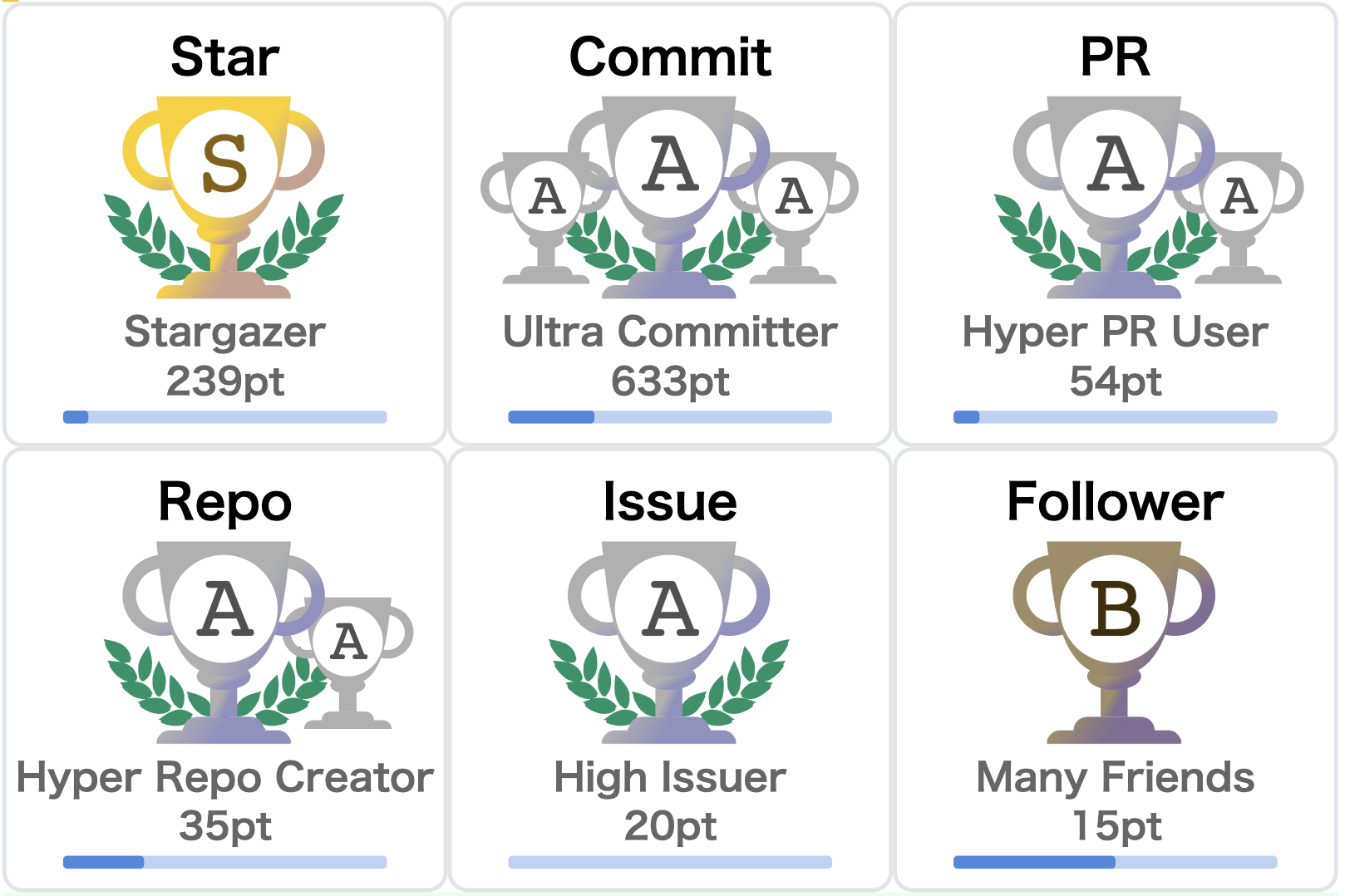
# About Display details

1. Title name of aggregation target.
2. Current Rank.
3. Title according to rank.
4. Target aggregation result.
5. Next Rank Bar. The road from the current rank to the next rank.
# Optional Request Parameters
* [title](#filter-by-titles)
* [rank](#filter-by-ranks)
* [column](#specify-the-maximum-row--column-size)
* [row](#specify-the-maximum-row--column-size)
* [theme](#apply-theme)
* [margin-w](#margin-width)
* [margin-h](#margin-height)
## Filter by titles
You can filter the display by specifying the titles of trophy.
```
https://github-profile-trophy.vercel.app/?username=ryo-ma&title=Followers
```

If You want to specify multiple titles.
```
https://github-profile-trophy.vercel.app/?username=ryo-ma&title=Stars,Followers
```
## Filter by ranks
You can filter the display by specifying the ranks.
`Available values: SECRET SSS SS S AAA AA A B C`
```
https://github-profile-trophy.vercel.app/?username=ryo-ma&rank=S
```

If you want to specify multiple ranks.
```
https://github-profile-trophy.vercel.app/?username=ryo-ma&rank=S,AAA
```
## Specify the maximum row & column size
You can specify the maximum row and column size.
Trophy will be hidden if it exceeds the range of both row and column.
`Available value: number type`
`Default: column=6 row=3`
Restrict only row
```
https://github-profile-trophy.vercel.app/?username=ryo-ma&row=2
```
Restrict only column
```
https://github-profile-trophy.vercel.app/?username=ryo-ma&column=2
```
Restrict row & column
```
https://github-profile-trophy.vercel.app/?username=ryo-ma&row=2&column=3
```
## Apply theme
Available themes.
| theme |
| ---- |
| [flat](#flat) |
| [onedark](#onedark) |
| [gruvbox](#gruvbox) |
| [dracula](#dracula) |
### flat
```
https://github-profile-trophy.vercel.app/?username=ryo-ma&theme=flat
```

### onedark
```
https://github-profile-trophy.vercel.app/?username=ryo-ma&theme=onedark
```
### gruvbox
```
https://github-profile-trophy.vercel.app/?username=ryo-ma&theme=gruvbox
```

### dracula
```
https://github-profile-trophy.vercel.app/?username=ryo-ma&theme=dracula
```

### monokai
```
https://github-profile-trophy.vercel.app/?username=ryo-ma&theme=monokai
```

## Margin Width
You can put a margin in the width between trophies.
`Available value: number type`
`Default: margin-w=0`
```
http://localhost:8080/?username=ryo-ma&margin-w=15
```

## Margin Height
You can put a margin in the height between trophies.
`Available value: number type`
`Default: margin-h=0`
```
http://localhost:8080/?username=ryo-ma&margin-h=15
```
## Example layout
```
http://localhost:8080/?username=ryo-ma&column=3&margin-w=15&margin-h=15
```

# Contribution Guide
## Environment
* Deno >= v1.3.0
* typescript == 3.9.7
* [Vercel](https://vercel.com/)
* GitHub API v4
## Local Run
Create `.env` file to project root directory, and write your GitHub token to the `.env` file.
Please select the authority of `repo` when creating token.
```
GITHUB_TOKEN=XXXXXXXXXXXXXXXXXXXXXXXXXXXXXXX
```
Run local server.
```
deno run --allow-net --allow-read --allow-env debug.ts
```
Open localhost from your browser.
http://localhost:8080/?username=ryo-ma
## Editor config
Read the [.editorconfig](./.editorconfig)
## Run deno lint
If you want to contribute to my project, you should check the lint with the following command.
```
deno lint --unstable
```